From 354 MB to 16 MB: Docker under the hood, multi-stage builds and a Vercel deploy from the terminal
What an image really is, what a container is, why the order of your Dockerfile decides how long you wait on every build, and how I ended up shipping a Go server to Vercel with a single command.
I wrote a twenty-line HTTP server in Go. The first image that packaged it weighed 354 MB. The final version, which does exactly the same thing, weighs 16 MB. I didn't change a single line of Go. I only changed how the Dockerfile was written.
This article explains why, starting with the basics: what an image is and what a container is. If you already have those down, skip to the caching section.
Image and container: the recipe and the dish
An image is a read-only package with everything an application needs to start: a minimal filesystem, libraries, the binary and the instruction for what to run. It doesn't run, doesn't change, has no state. It's a template.
A container is a running image. Docker takes the image, puts a thin writable layer on top of it, gives it its own process and network space, and starts the command. Whatever the program writes goes to that layer, never to the image.
If the image is the recipe, the container is the dish being served. You can serve ten dishes from the same recipe, and if you salt one of them, the recipe doesn't change and neither do the other nine.
How a Dockerfile becomes layers
An image is not a single block. It's a stack of layers, and almost every instruction in the Dockerfile produces one. Each layer stores only what changed compared to the previous one.
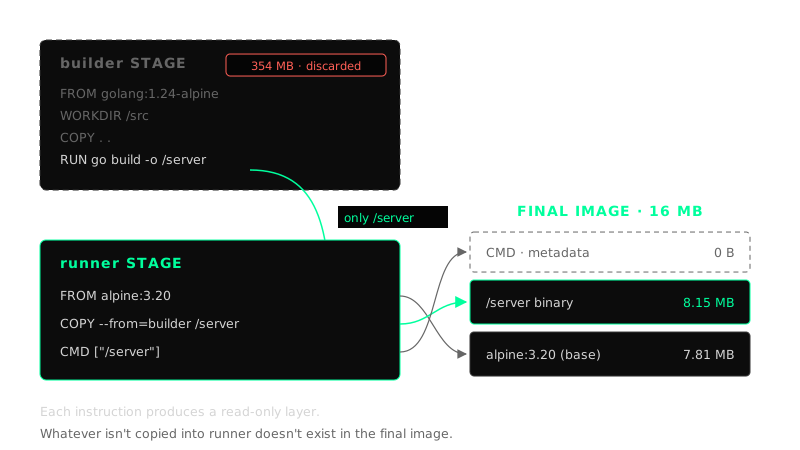
This is the final Dockerfile of my project:
FROM golang:1.24-alpine AS builder
WORKDIR /src
COPY . .
RUN go build -o /server main.go

FROM alpine:3.20 AS runner
COPY --from=builder /server /server
CMD [ "/server" ]
And this is what Docker reports for the final image with docker history:
CMD ["/server"]                         0B
COPY /server /server                    8.15MB
CMD ["/bin/sh"]                         0B
ADD alpine-minirootfs-3.20.10 ...       7.81MB
Two layers with weight: the Alpine base system (7.8 MB) and my binary (8.1 MB). Instructions like CMD or WORKDIR only store metadata and weigh 0 bytes. There are the 16 MB, not one more.
The cache: step order matters
Because each layer depends on the one before it, Docker can reuse them. On a rebuild it walks the Dockerfile top to bottom and, as long as the instruction and its input files haven't changed, it uses the layer it already has stored. As soon as one layer changes, every layer after it gets rebuilt.
That turns ordering into a design decision. The rule: what rarely changes goes on top, what changes often goes at the bottom.
In a Go project with dependencies, the difference looks like this:
# Bad: any code change invalidates the dependency download
COPY . .
RUN go mod download
RUN go build -o /server .
# Good: dependencies are only downloaded if go.mod or go.sum change
COPY go.mod go.sum ./
RUN go mod download
COPY . .
RUN go build -o /server .
In the bad version, editing a comment in main.go changes the context of COPY . ., and that forces every dependency to be downloaded again. In the good one, go.mod and go.sum didn't change, so the dependency layer comes from cache and only the code is recompiled.
The benefits are concrete:
- Faster builds. The expensive work (downloading dependencies, installing system packages) is done once and reused.
- Less network and disk. Shared layers are stored only once, even if many images use them.
- Lighter deploys. When pushing or pulling an image, only the layers the destination doesn't have travel.
One detail that completes the rule: a .dockerignore file that excludes .git, node_modules or local binaries keeps irrelevant changes from invalidating COPY . ..
Multi-stage: build in one image, run in another
Here's the difference between 354 MB and 16 MB.
To compile Go you need the compiler, the standard library and the build tools. To run the resulting binary you need none of that. A single-stage Dockerfile puts everything into the final image:
# The bad: a single stage. The final image drags the compiler along.
FROM golang:1.24-alpine
WORKDIR /src
COPY . .
RUN go build -o /server main.go
CMD [ "/server" ]
A multi-stage build separates responsibilities. Each FROM starts a new stage with its own base:
builderstarts fromgolang:1.24-alpine, compiles and produces the binary. It's a throwaway stage.runnerstarts fromalpine:3.20, which is clean, and withCOPY --from=buildertakes only the binary.
Everything that was in builder (the compiler, the source code, the build cache) stays out of the final image. Measured on my machine:
| Image | Size | Contains the compiler? | Contains the source code? |
|---|---|---|---|
builder stage (same as a single stage) |
354 MB | Yes | Yes |
runner stage (final image) |
16 MB | No | No |
95% smaller. And it's not just size: fewer things inside means fewer packages with vulnerabilities, nothing useful for an attacker who gets into the container, and faster startups because there's less to download.
Naming the stages also helps with debugging. If something fails at compile time, you can build just that stage:
docker build -f Dockerfile.vercel --target builder -t go-vercel:builder .
Many containers, one image, zero interference
Because the image is read-only, nobody can modify it while it runs. Each container gets its own writable layer on top of the same shared layers. That's what lets you start ten containers from the same image without them stepping on each other.
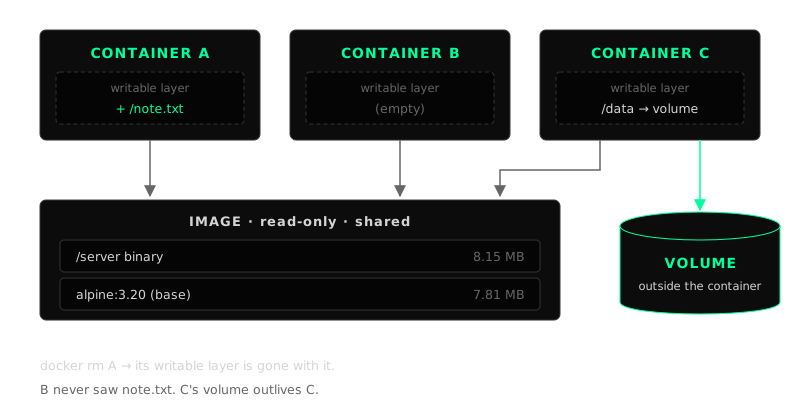
I tested it with two containers from the same Alpine image:
docker run -d --name a alpine:3.20 sleep 300
docker run -d --name b alpine:3.20 sleep 300

docker exec a sh -c 'echo hello > /note.txt'

docker exec a cat /note.txt   # hello
docker exec b cat /note.txt   # No such file or directory
The file exists in a and not in b. They wrote on top of the same image, but each one in its own layer.
Why data is lost without a volume
The writable layer lives and dies with the container. If you remove the container, its layer goes with it. Continuing the example:
docker rm -f a
docker run -d --name a alpine:3.20 sleep 300
docker exec a cat /note.txt   # No such file or directory
Same name, same image, but it's a new container with a new, empty layer. The note is gone.
And that's not a bug, it's the design: containers are ephemeral on purpose, so you can destroy, replace and scale them without fear. A version upgrade, for example, is exactly that: remove the old container and create a new one from the new image.
Whatever has to survive (a database, files uploaded by users) goes in a volume: storage that Docker manages outside the container and mounts at a path inside it.
docker volume create notes
docker run --rm -v notes:/data alpine:3.20 sh -c 'echo hello > /data/note.txt'
docker run --rm -v notes:/data alpine:3.20 cat /data/note.txt   # hello
The first container wrote and was destroyed (--rm). The second, brand new, found the file. The data lived in the volume, not in the container.
The practical rule: the image is the code, the container is the process, the volume is the state.
The finale: from the terminal to Vercel
With the image optimized, all that was left was shipping it. Vercel can run containers: if the project has a Dockerfile.vercel, it uses it to build the image, starts the final stage and injects the PORT variable. That's why the server reads it from the environment instead of hardcoding it:
port := os.Getenv("PORT")
if port == "" {
    port = "80"
}
The whole deploy was done from the terminal, with no connected repository and no pipeline:
vercel link    # links the folder to a project
vercel --prod  # builds the image and publishes it to production
Vercel detected the project with the Container preset, built both stages, and 34 seconds later the server was responding:
curl https://05-vercel-bice.vercel.app
# Hello from a container on Vercel 👋
What I take away
- An image is a read-only template made of layers; a container is that template running, with its own layer to write to.
- The order of the Dockerfile decides what gets reused from cache: stable things on top, changing things at the bottom.
- Multi-stage separates the workshop from the shop window: you build with everything, you ship only what's needed. In this case, from 354 MB to 16 MB.
- Containers from the same image don't affect each other because each one writes to its own layer.
- Whatever isn't in a volume is lost when the container is removed, and that's an advantage if you design for it.
The code is at github.com/rubenerangel/go-docker-vercel and the live demo at 05-vercel-bice.vercel.app. Tools: Go 1.24, Docker with BuildKit, Alpine 3.20 and the Vercel CLI.